 natbox
Blog / IPv4 economics
Why a NAT VPS can cost $1: the economics of an IPv4 address
12 November 2026 · Guide · By Mohammad AlSaraf
Our cheapest plan costs $1.00 a month. That's less than the rent on a single IPv4 address at many providers. So how does it work? The short answer: you don't get an IPv4 address of your own. You share one, and here are the numbers behind that.
IPv4 addresses are scarce, and they cost money
There are only about 4.3 billion IPv4 addresses, and the free pools ran out years ago. Today they are bought, sold and rented like property:
- Buying: broker reports put the average 2026 price at around $20 per address, down from a peak of roughly $45 to $60 in 2021 and 2022 (IPv4Center, IPXO).
- Renting: leases run at roughly $0.35 to $0.60 per address per month on the wholesale market.
- At a hosting provider: the retail price is far higher. Our own provider, Contabo, charges €3.50 a month for one additional IPv4 address on a VPS (Contabo help).
These figures come mostly from brokers and vary by source and block size, so treat them as a range, not an exact price. The point stands either way: if every $1 server came with its own IPv4 address at retail prices, the address alone would cost several times the whole plan.
How sharing works on natbox
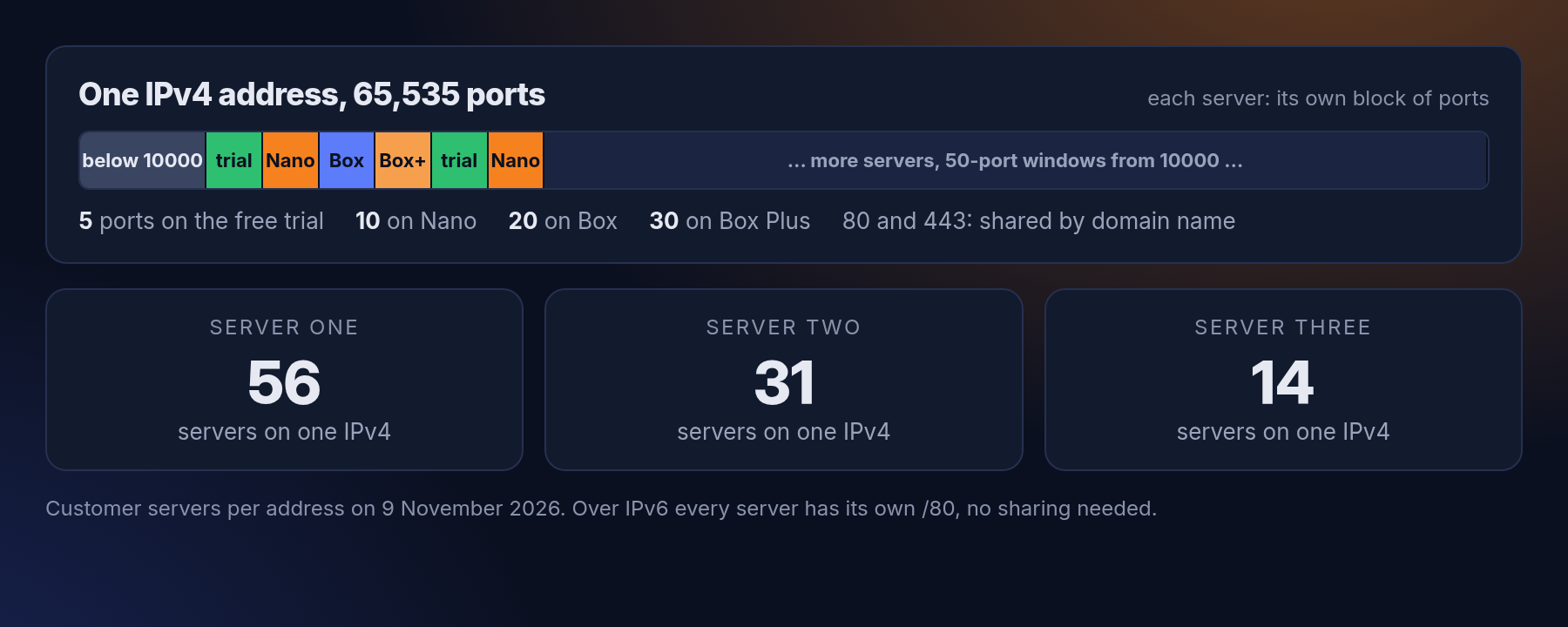
Each of our hosts has one public IPv4 address. Every server on that host gets its own block of ports on it: 5 on the free trial, 10 on Nano, 20 on Box and Box CPU, 30 on Box Plus. The first port goes to SSH, the rest go straight to the same port numbers inside your server. On 9 November 2026 our three addresses carried 56, 31 and 14 customer servers.
So the cost of one address is split dozens of ways. Even at Contabo's retail €3.50, that's well under 10 cents a month per server on our busiest host. That is most of the trick behind a $1 plan.
Ports 80 and 443 can't be split into blocks, because every website needs them. So we share those by domain name: you link your domain in the client area, and our proxy sends each visitor to the right server without decrypting anything (we load-tested it).
What you give up
- Standard port numbers over IPv4. Your SSH is on a port like 10050, not 22, and a game server or VPN runs on one of your own port numbers. Most software is happy with that. A few things, like some game clients with a fixed port, are not.
- Only your ports. Over IPv4, only the ports in your block reach your server, plus 80 and 443 for linked domains.
- No outgoing mail ports. Ports 25, 465 and 587 are blocked for everyone, because one spammer would get the shared address blocklisted for all.
- A shared reputation. If someone abuses the address, everyone on it could suffer. That's why we take abuse seriously (how we handle abuse reports).
IPv6 doesn't have the problem
IPv6 has so many addresses that nobody needs to share. Every natbox server, including the free trial, gets its own routed /80: 248 addresses, every port open, port 22 and 443 included, no proxy in between (how it works). As more of the internet speaks IPv6, the shared IPv4 address matters less and less.
Who a NAT VPS is for
If you need a full IPv4 address with every port, a NAT VPS isn't the right tool, and that's fine. If you want a real Linux server for a bot, a small website, a VPN, a monitoring tool or for learning, sharing an IPv4 address is what lets it cost less than a coffee. See the plans.
Get new tutorials in Telegram. Follow @natboxio: every new post, plus short server tips.
More from the blog: Why did my app stop? Read your server's logs with journalctl, How fast is a new natbox server? We timed 108 real orders, Open a private admin page with an SSH tunnel, no open port needed. RSS feed.