 natbox
Blog / Proxy load test
We load-tested our shared HTTPS proxy: 15,000 connections, zero drops
9 November 2026 · Update · By Mohammad AlSaraf

On a NAT VPS, ports 80 and 443 of the public IPv4 address are shared by everyone on the node. A reviewer recently asked two fair questions: what happens to a connection the proxy can't place, and how much can the proxy actually take? We checked the first in our config and answered the second with a load test. Here is what we did and what we found, including the parts that weren't perfect.
How HTTPS reaches your server
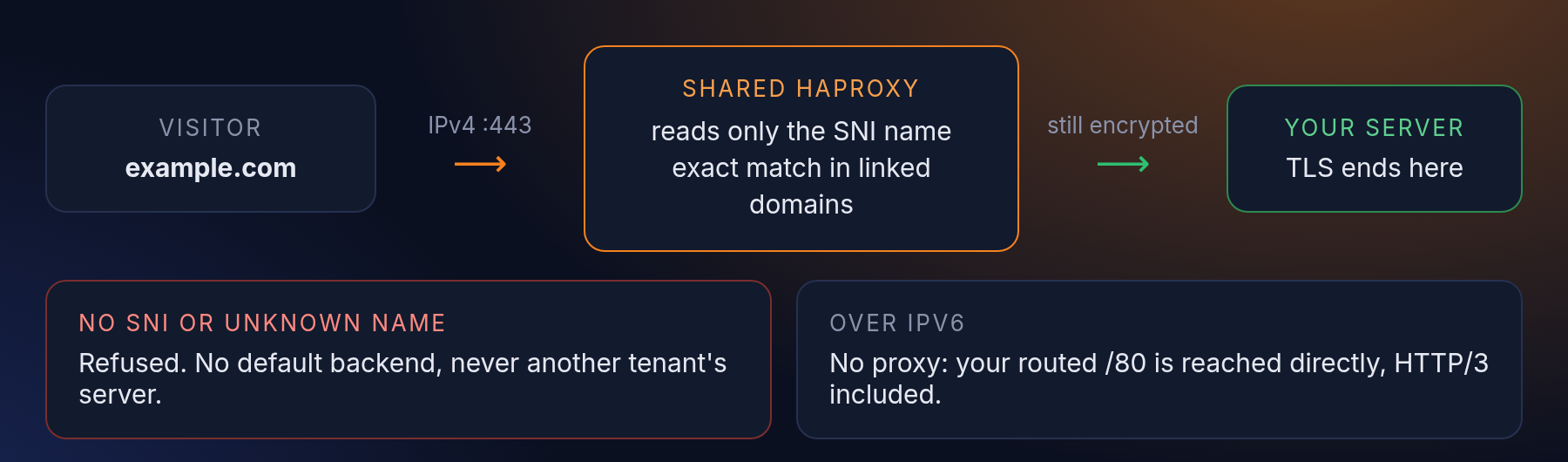
Each node runs HAProxy in TCP mode. It reads one thing from the start of the TLS handshake, the domain name the browser asks for (SNI), looks it up in the list of domains our customers have linked and verified, and passes the still-encrypted connection to that customer's server. We never terminate TLS or hold your certificate.
- It fails closed. The lookup is an exact match. If no name is sent, or the name isn't linked to a natbox server, the connection is refused. There is no default backend, so a connection can never land on someone else's server. We confirmed this live during the test.
- Fair use per visitor. One source address can open up to 200 new connections in any 10 seconds and keep up to 100 open at once.
- Over IPv6 there is no proxy at all: every server has its own routed /80, so visitors reach it directly. That is also where HTTP/3 works, because UDP 443 isn't forwarded on the shared IPv4. Details are in our docs.
How we tested
- One production node: 18 vCPU, HAProxy 2.8 with 18 threads, a configured maximum of 20,000 connections. We picked it because no customer domain was linked there yet, so no customer HTTPS traffic went through the proxy we were stressing.
- A temporary test server on the same node ran nginx with a self-signed certificate and was capped at 4 CPU cores. We added its test domain to the proxy in memory only and removed it afterwards.
- The load generator ran on the node itself and spread its connections over 250 local source addresses, so the per-visitor limits above weren't what we measured.
- A separate probe opened one real connection every second throughout, to see what an ordinary visitor would have experienced.
Results
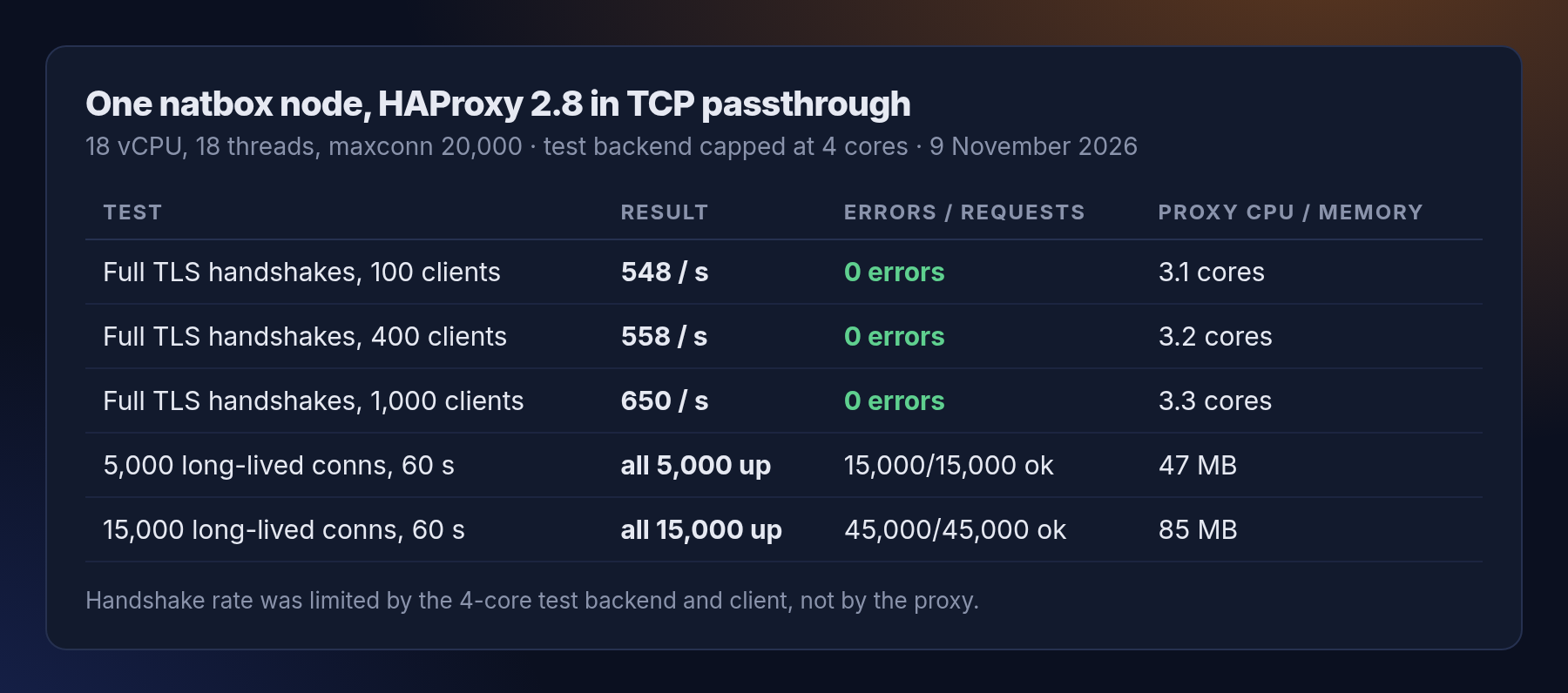
New connections. Each one was a full TLS handshake, one HTTP request and a close, with no session reuse. With 100, 400 and 1,000 clients at once we got 548, 558 and 650 handshakes a second, over 53,000 in total, with zero errors.
Long-lived connections. We opened 5,000 and then 15,000 TLS connections, kept them for a minute and sent a request on every one of them every 20 seconds. All 15,000 stayed up and all 45,000 requests were answered. The proxy used 85 MB of memory for them, about 5 KB per connection, and under 2 CPU cores.
What the numbers mean, and what they don't
- The handshake figure is not the proxy's limit. In passthrough mode the expensive part of TLS happens on the server behind the proxy. Ours had 4 cores and became the bottleneck, together with the load generator. HAProxy itself used about 3 of its 18 cores at the busiest point.
- The real ceiling is the connection limit: 20,000 open connections per node, which we set ourselves. 15,000 held without trouble.
- It wasn't free. During the heaviest 30-second step the node's load briefly rose well above its core count, almost all of it from our test client and test server rather than the proxy. Our probe's handshake time went from its usual 15 to 20 ms to as much as 1 second at that moment, and to 2.7 seconds once while we opened 15,000 connections within 20 seconds. That's why we kept each step short, and why we'd run a test like this again only at a quiet hour.
- This is one node and one short test, not a lab benchmark. Real traffic is spread over many visitors and many customer servers, which is easier on the proxy than one test server taking everything.
What this means for your server
If you host a website on natbox, the shared proxy is very unlikely to be what slows you down. Your own server, with its share of CPU, will run out of TLS handshakes long before the proxy does. If you want to skip the proxy completely, add an AAAA record: IPv6 visitors then connect straight to your server, with HTTP/3 if you enable it. You link a domain in the client area (guide).
We'll keep publishing numbers like these as natbox grows. If you'd like to see a test we haven't run, tell us at support@natbox.io.
Get new tutorials in Telegram. Follow @natboxio: every new post, plus short server tips.
More from the blog: Open a private admin page with an SSH tunnel, no open port needed, Disk full? Find what is filling your server, and clean it up safely, Keep commands running after you disconnect, with tmux. RSS feed.