 natbox
Blog / Restart report
Restarting for a kernel update: what happened, minute by minute
13 November 2026 · Update · By Mohammad AlSaraf
Every natbox server is a container sharing its host's Linux kernel. A kernel security update therefore protects every customer at once, but it only takes effect after the host restarts, which briefly takes every server on it offline. On the morning of 9 November 2026 we restarted two of our three hosts. This is what our monitoring recorded, including the part that didn't go to plan.
The plan
- Install Linux kernel 6.8.0-149 on server one and server three. Server two was already running it.
- Restart one host at a time, early in the morning (UTC), and watch everything come back.
- Announce it on our status page before starting, and email every customer with a server afterwards.
Timeline (UTC)
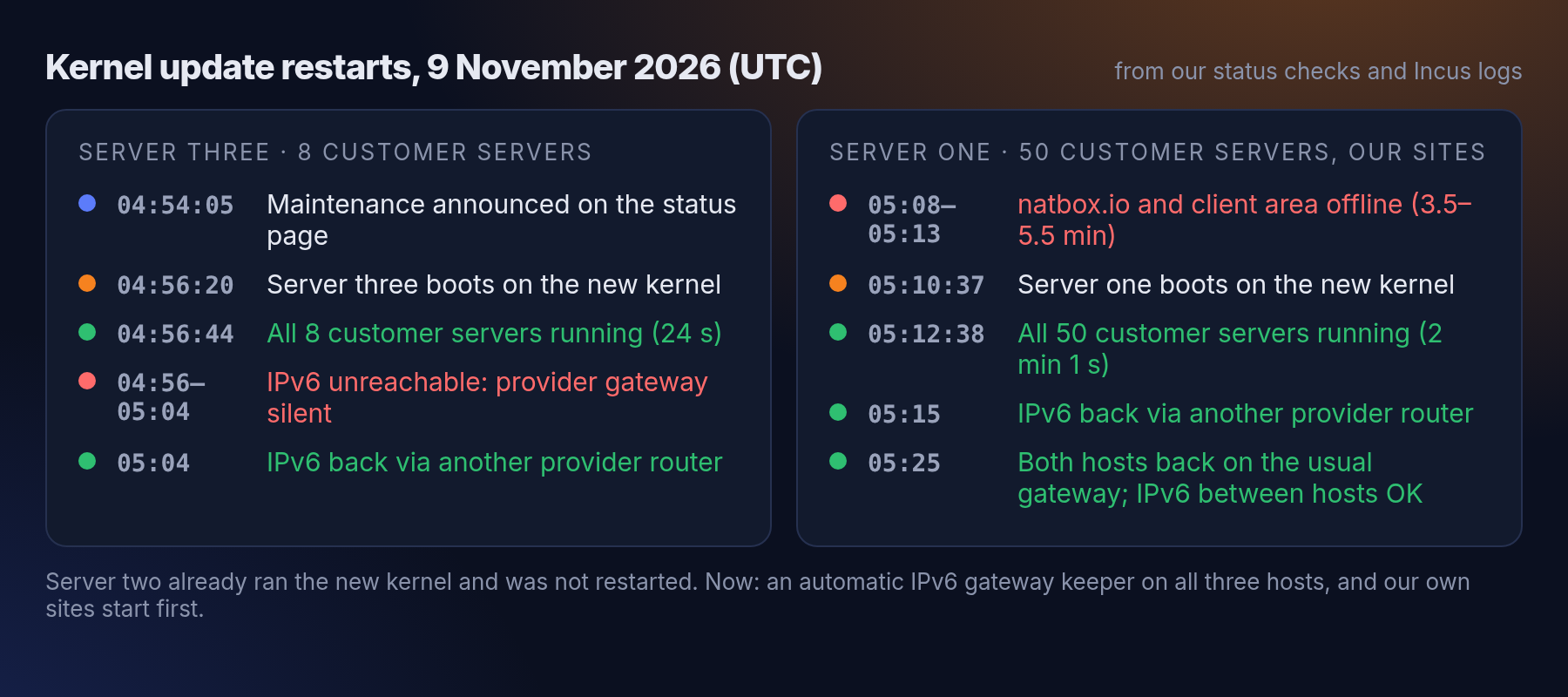
Server three (8 customer servers) booted at 04:56:20. All 8 servers were running again 23 to 24 seconds later. IPv4 answered at once. IPv6 did not, and was unreachable from outside until about 05:04 (more below).
Server one (50 running customer servers, plus our website, client area and status page) booted at 05:10:37. The first customer server was running 40 seconds later and the last one 2 minutes and 1 second later. Servers that were stopped before the restart stayed stopped. Because our status checker also runs on server one, it was silent from 05:08:02 to 05:13:33: natbox.io and the client area were offline for between three and a half and five and a half minutes. At 05:13 IPv6 was down here too, and it was back by 05:15.
What went wrong: IPv6
On both hosts the provider's usual IPv6 gateway (fe80::1) did not answer for a while after the restart, while their other routers on the same network did. Within minutes we pointed the default route at one of those other routers, and IPv6 to and from the internet worked again.
That fix had a side effect we didn't see straight away: those other routers reach the internet but not the provider's other IPv6 networks, which is where our other hosts are. So our three hosts could not reach each other over IPv6, and our status page showed two hosts as "degraded" until about 05:25. By then the usual gateway answered again on both hosts, and we moved them back to it. Customer traffic from the internet was not affected by this second part. We only noticed it because our status page also checks IPv6 between our own hosts, and that check stays.
What we changed
- An automatic IPv6 gateway keeper now runs on all three of our hosts, 30 seconds after boot and then every minute. If the usual gateway stops answering, it switches to another router that works, preferring one that also reaches our other hosts. As soon as the usual gateway answers again, it switches back. We tested it by pointing the route at a dead gateway on purpose: it recovered in 33 seconds and moved back by itself.
- Our own sites start first now. After a restart, the website, client area and status page start before the customer servers instead of last.
In short
- Customer servers back after the host booted: within 24 seconds on server three, within 2 minutes on server one.
- IPv6: back from outside within about 8 minutes on server three and about 5 on server one. Now handled automatically on every host.
- No data was lost, and every server kept its files, settings and IP addresses.
Restarts like this are rare, but they will happen again, because kernel updates matter. When they do, we'll announce them on the status page first. You can also follow @natboxio on Telegram for notices.
Get new tutorials in Telegram. Follow @natboxio: every new post, plus short server tips.
More from the blog: Why one new server took two minutes, and how we made setup faster, Why a NAT VPS can cost $1: the economics of an IPv4 address, Why did my app stop? Read your server's logs with journalctl. RSS feed.