 natbox
Blog / Slow server setup
Why one new server took two minutes, and how we made setup faster
12 November 2026 · Update · By Mohammad AlSaraf

On 12 November a customer paid for a new server and then saw "not ready" in the client area, with no address and no root password. The server itself had been created and was running the whole time. This post explains what went wrong, why setting up new servers had quietly become slower, and what we changed. We posted the incident on our status page the same day.
What happened
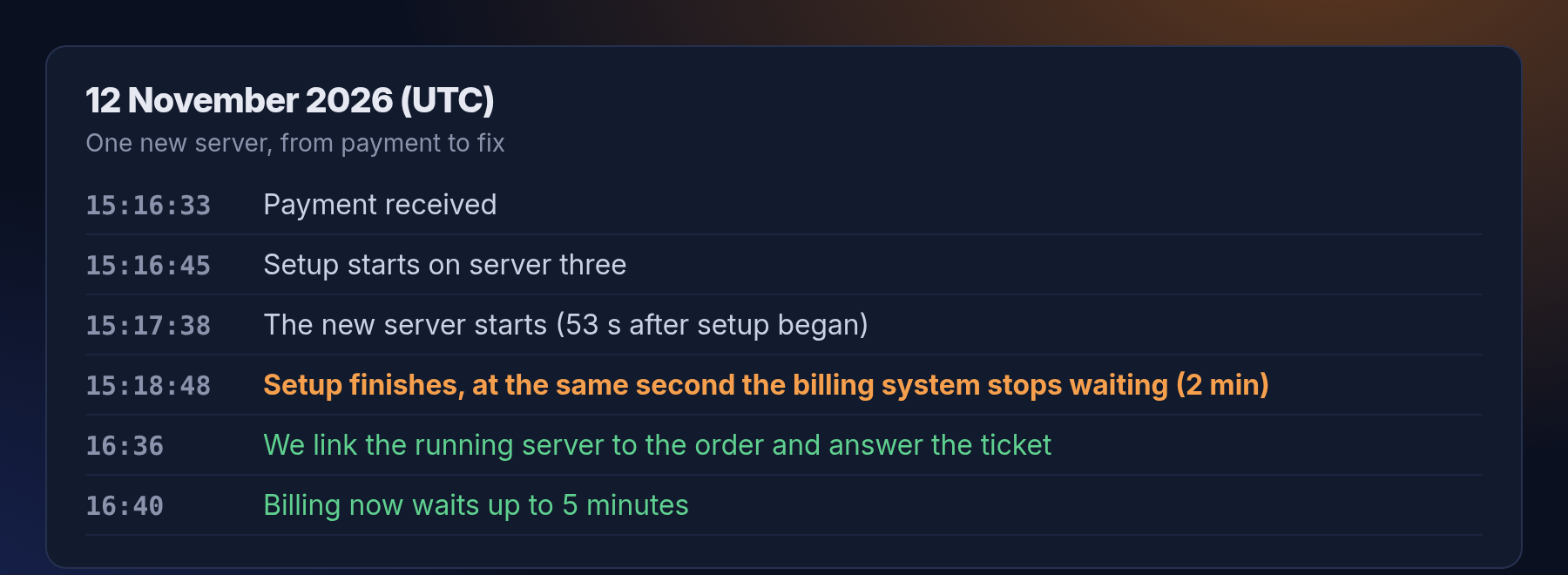
When you pay, our billing system asks the server host to create your server and waits for the answer. It waited at most 2 minutes. This time setup took just as long, so the billing system gave up at the same second the server was finished. It never recorded which server belonged to the order, so the client area kept saying "not ready", and the welcome email with the root password was never sent.
- Who was affected: one order. It is the only time this has happened.
- How we fixed it for the customer: we linked the running server to the order about 80 minutes later, replied to their ticket with the connection details, so they could set a new root password in the client area.
Why setup had become slow
Most of the two minutes passed before the new server even started. When we traced a test setup step by step, the time went into one question our setup tool asks the host: "which servers do you have?" To answer it, the tool asked for the full list of servers including each one's live CPU, memory and network figures. It only needed one setting per server, but the host still had to collect the live figures of every server first.
- That took 2.7 to 10 seconds on our busiest host, with 56 servers. It grows with every new server and gets much slower when the host is busy.
- Each new server asked the question at least twice: once to check that the host had room, and once to pick a free slot for the new server.
- That afternoon the host was busier than usual, most likely because our monitoring asks the same kind of question every minute and the requests queued up. One setup took about 2 minutes. Earlier the same day, setups took 12 to 26 seconds.
What we changed
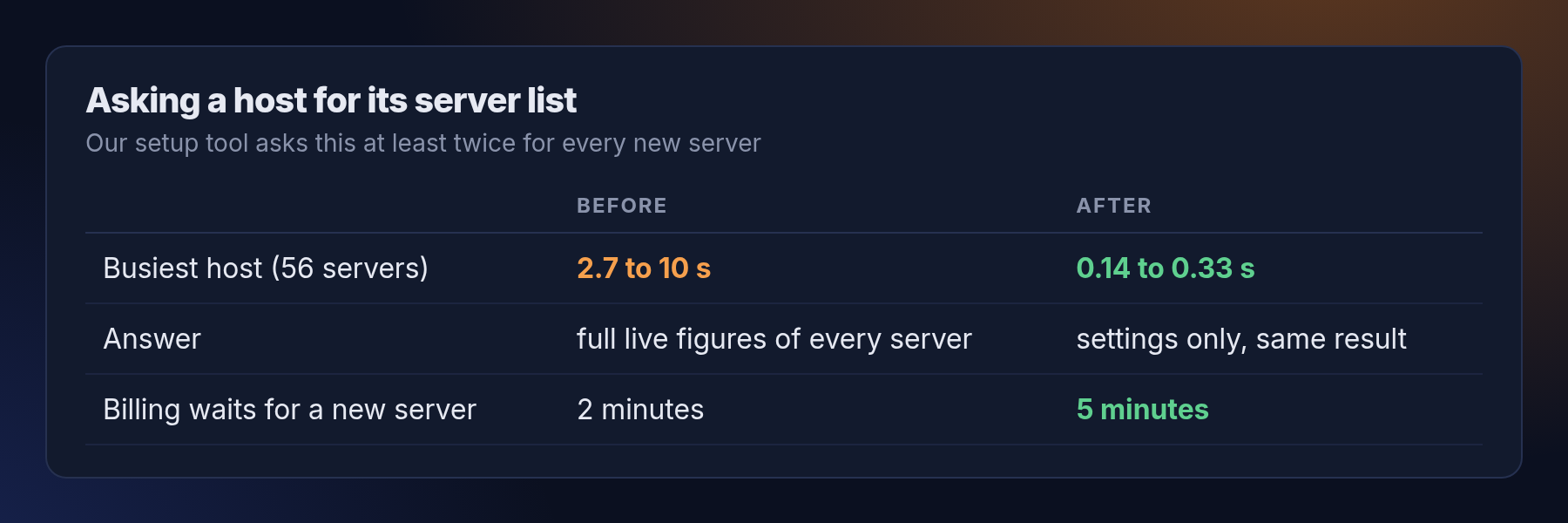
- Ask only for what we need. The setup tool now asks the host for each server's settings only, without the live figures. The answer is the same, and it comes back about 19 times faster: 0.14 to 0.33 seconds instead of 2.7 seconds or more. We checked that the result was identical on all three hosts before and after the change.
- A wider safety margin. The billing system now waits up to 5 minutes for a new server instead of 2. While doing this we found a related setting that could have let a very slow setup start twice; we raised it too, so that cannot happen.
- What did not change. Ubuntu servers still take 10 to 15 seconds longer than Debian or AlmaLinux. That is normal first-boot work (creating SSH keys and starting the network) on a server with its plan's share of CPU.
What we learned
- A step that is fast with 10 servers can be slow with 50. We now look for calls that do more work than they need as the hosts fill up.
- A timeout should never be shorter than the slowest thing it waits for. When it is, a job that actually worked looks like a failure.
- Being open about it helps. We posted it on the status page while we were still fixing it, and wrote this post so you can see exactly what happened.
If you ever pay for a server and it does not appear within a few minutes, open a ticket or write to support@natbox.io. You will hear from a person, not a bot.
Get new tutorials in Telegram. Follow @natboxio: every new post, plus short server tips.
More from the blog: Why a NAT VPS can cost $1: the economics of an IPv4 address, Why did my app stop? Read your server's logs with journalctl, How fast is a new natbox server? We timed 108 real orders. RSS feed.