 natbox
Blog / Faster disk writes
We made disk writes on natbox over 100 times faster. Here's the trade-off
14 November 2026 · Update · By Mohammad AlSaraf

Installing packages on a new natbox server was slower than it should have been. On a busy morning, apt install python3-pip could take several minutes. We dug into why, tried the safe fixes first, and ended up making a choice we want to explain openly, because it changes what "saved to disk" means on your server.
Why it was slow
When a program needs data to really be on disk, for example a database committing a transaction or dpkg unpacking a file, it calls fsync and waits until the storage confirms. Package installs do this for every single file. So we measured how many of those forced 4 KB writes per second each layer could do:
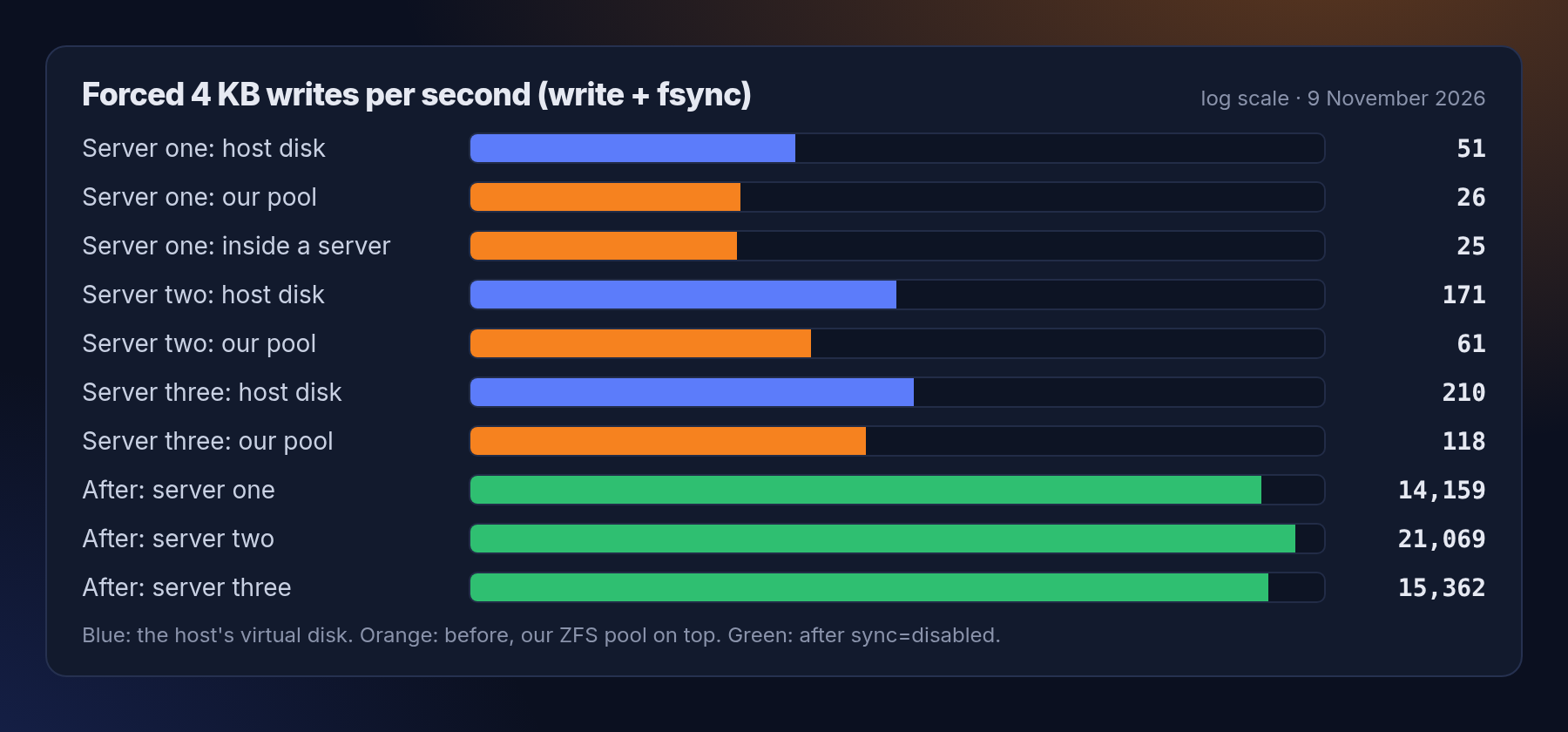
Two things stand out. First, the virtual disks our hosts run on are slow at this, and server one's is the slowest: 51 forced writes a second before anything of ours is involved. Second, our storage layer (ZFS, kept in a file on that disk) roughly halves it again, because every forced write has to be confirmed by two filesystems. Inside a server on server one that left about 25 a second. Installing a package with 6,699 files, each forced to disk, adds up.
The safe fixes made it worse
We first tried the changes that keep every guarantee, on a scratch pool so that nobody's server was affected:
- Telling ZFS to optimise forced writes for throughput instead of latency (
logbias=throughput): 119 a second instead of 175. Worse. - Putting the pool on a loop device with direct I/O, to skip one layer of caching: 139. Also worse.
The only way past the ceiling of the host disk would be faster disks. That is a bigger project, and it would still be limited to a few hundred forced writes a second.
What we changed, and the trade-off
On 9 November we set ZFS to sync=disabled for customer servers. A forced write now returns immediately, and ZFS writes everything to disk together, about every 5 seconds, as one atomic step.
- Your filesystem always stays consistent. ZFS never ends up half-written, so a crash can't corrupt it.
- The cost: if one of our host servers crashed or lost power, the last few seconds of writes could be lost, even if a program had been told they were saved. Your server would come back as if it had stopped a few seconds earlier. Databases recover from that the same way as from any crash.
- Our own billing system keeps full safety. Payments and invoices still wait for the disk.
We think that's the right deal for small servers: host crashes are rare, and when they happen, losing a few seconds is far better than every install and every database write being slow all the time. It is written down in our docs, and if you'd rather your server kept the old behaviour, just ask: it's one setting per server.
The results
- Forced writes inside a server went from about 25 a second to over 14,000.
- Installing
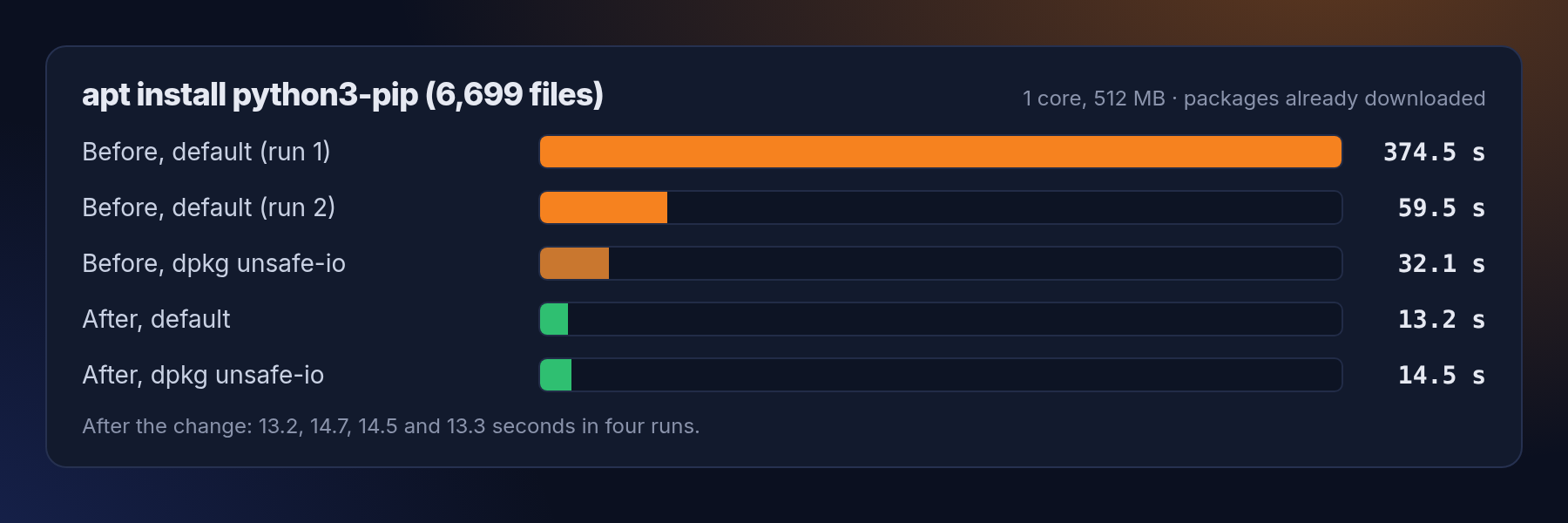
python3-pip(6,699 files, packages already downloaded) on a small 1-core server took 374 and 60 seconds in two runs before, depending on what else the disk was doing. After the change it took 13 to 15 seconds, four runs in a row. - On 8 November we suggested a
dpkgsetting for faster installs. You no longer need it: with or without it, installs now take the same time. It's harmless to keep, or you can delete/etc/dpkg/dpkg.cfg.d/unsafe-io.
Nothing for you to do: the change applies to every server, including new ones and reinstalls.
Get new tutorials in Telegram. Follow @natboxio: every new post, plus short server tips.
More from the blog: Restarting for a kernel update: what happened, minute by minute, Why one new server took two minutes, and how we made setup faster, Why a NAT VPS can cost $1: the economics of an IPv4 address. RSS feed.